How Poker Now's Session Ledger Makes Home Game Settlements Easier
Published at: August 7, 2026
How Poker Now’s Session Ledger Makes Home Game Settlements Easier
Running a private poker game is easy when everyone is focused on the cards. The hard part often comes later: remembering who bought in, who added chips, who cashed out, and what each player should be up or down at the end of the night.
That is exactly what the Poker Now Session Ledger is built for.
The Session Ledger is a live buy-in and buy-out summary inside your Poker Now table. It helps hosts and players track each player’s total buy-ins, buy-outs, current stack, and net result without maintaining a separate spreadsheet during the game.
How to open the Session Ledger
You can open the ledger directly from the poker table.
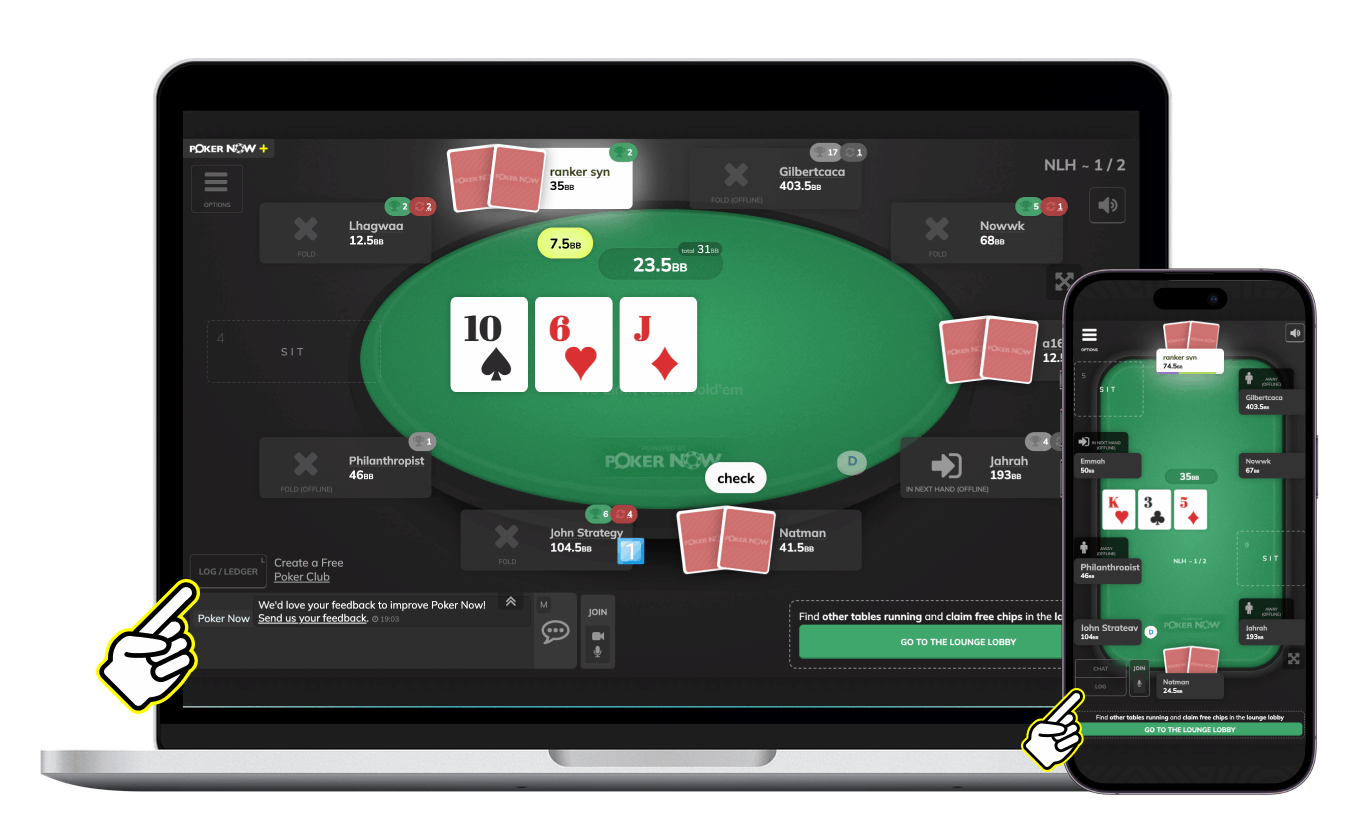
On desktop or landscape view, click Log / Ledger near the table controls. On smaller screens, the same entry point may appear as Log. When the log window opens, choose the Ledger tab.
From there, you can review the live session summary, expand a player for more details, or download the ledger as a CSV.
Why a poker session ledger matters
In a live home game, someone usually keeps a notebook, a spreadsheet, or a group chat thread to track chips. In an online poker home game, the same problem still exists: players join, leave, rebuy, add chips, remove chips, and come back later.
Without a clear poker ledger, small mistakes turn into awkward questions:
- Did that player buy in once or twice?
- Did they leave with chips earlier in the session?
- Is their current stack already counted?
- Who is actually up or down right now?
Poker Now’s Session Ledger gives the table a shared source of truth for those questions.
What the Session Ledger shows
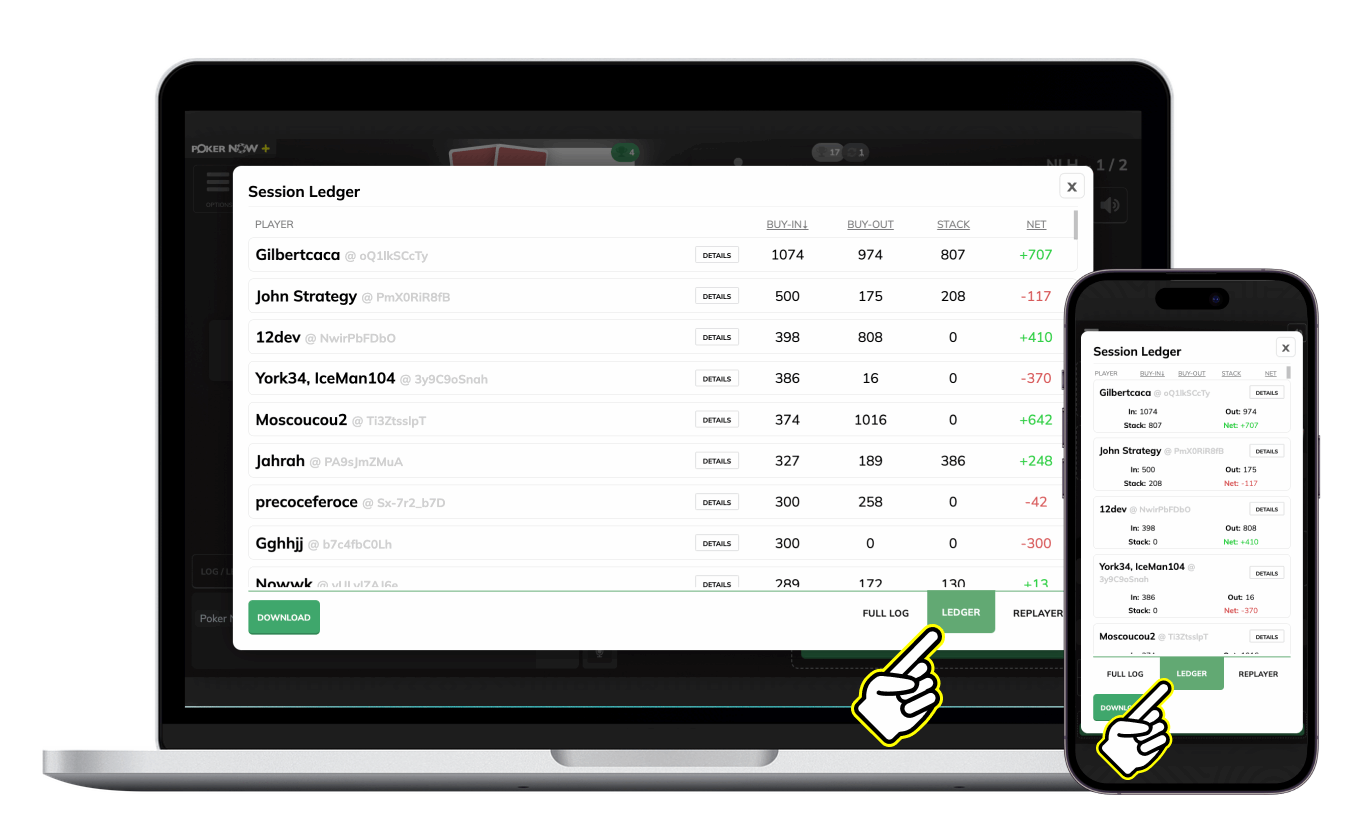
The ledger summarizes the session by player. For each player, Poker Now shows:
- Player: the player’s name and player ID.
- Buy-In: the total amount the player brought into the game.
- Buy-Out: the total amount the player took out of the game.
- Stack: the player’s current stack if they are still seated.
- Net: the player’s current result for the session.
The table can be sorted by Buy-In, Buy-Out, Stack, or Net, which makes it easier to review the biggest winners, largest buy-ins, or active stacks at a glance.
How Poker Now calculates the net result
The most useful number in any poker buy-in tracker is the net result.
In Poker Now, the ledger accounts for both completed and active sessions. If a player already left the table, their buy-out is counted. If a player is still seated, their current stack is counted too.
In plain English:
Net = buy-outs + current stack - buy-ins
That means the ledger is useful during the game, not only after the last hand. Hosts can open it mid-session to understand where the table stands, and players can check their own result without waiting until they leave the seat.
For game formats that need extra accounting, Poker Now can also adapt the ledger display. For example, when Nit Game escrow is active, the ledger includes that value in the session accounting.
Drill into each player’s session history
A session summary is helpful, but sometimes you need the details.
Poker Now lets you expand a player row to see the player’s session breakdown. The details can show when a session started and ended, plus the movements that affected the player’s stack, such as:
- Took a seat
- Left the seat
- Add-on
- Removed chips
- Reset stack
This makes the ledger more than a final scoreboard. It gives hosts a way to understand how the result was built over the course of the game.
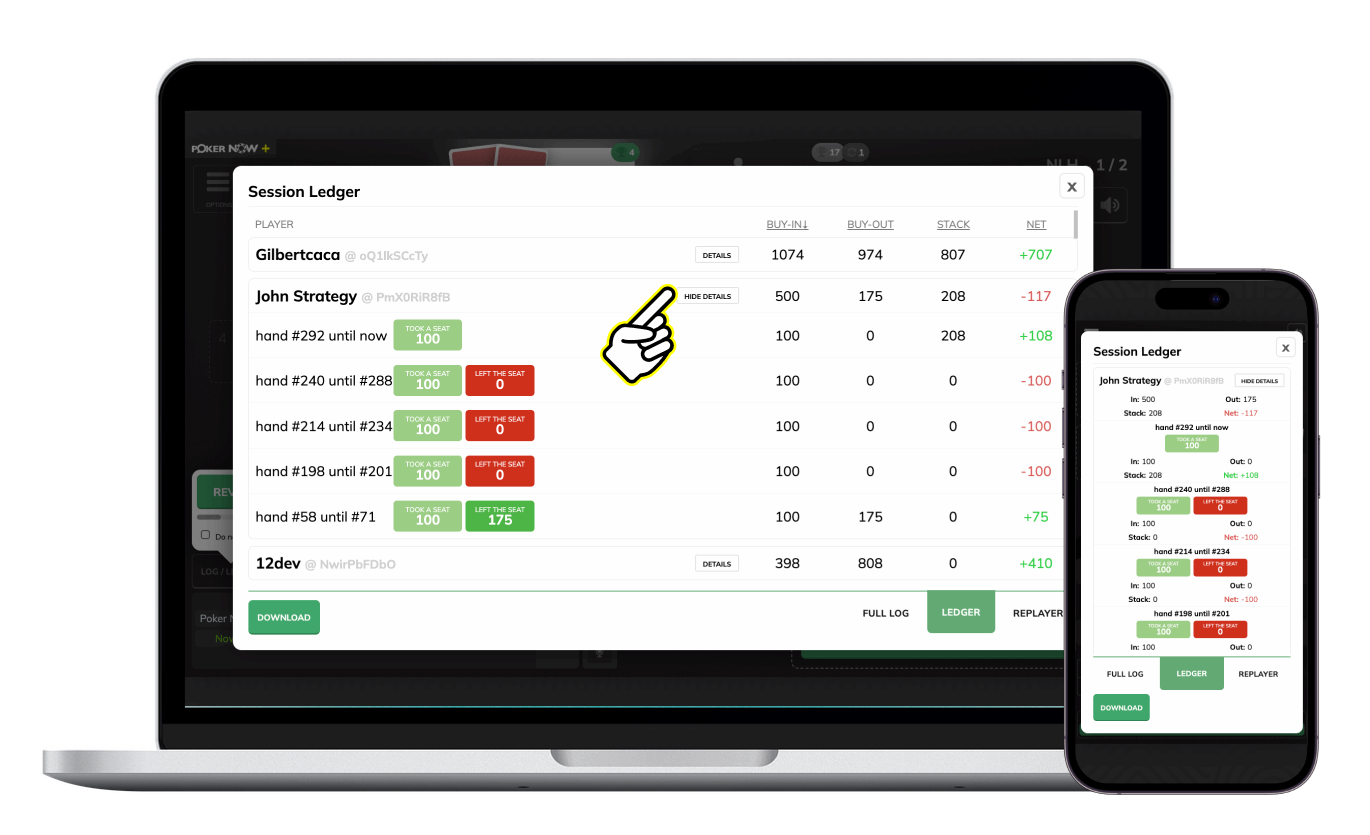
Table totals help hosts check the game
The Session Ledger also shows table totals for buy-ins, buy-outs, and stacks. That gives hosts a quick way to check whether the session looks balanced and whether active stacks are being counted correctly.
For groups that run longer games, games with many rebuys, or casual home games where players come and go, this summary can save a lot of end-of-night cleanup.
Export the ledger as a CSV
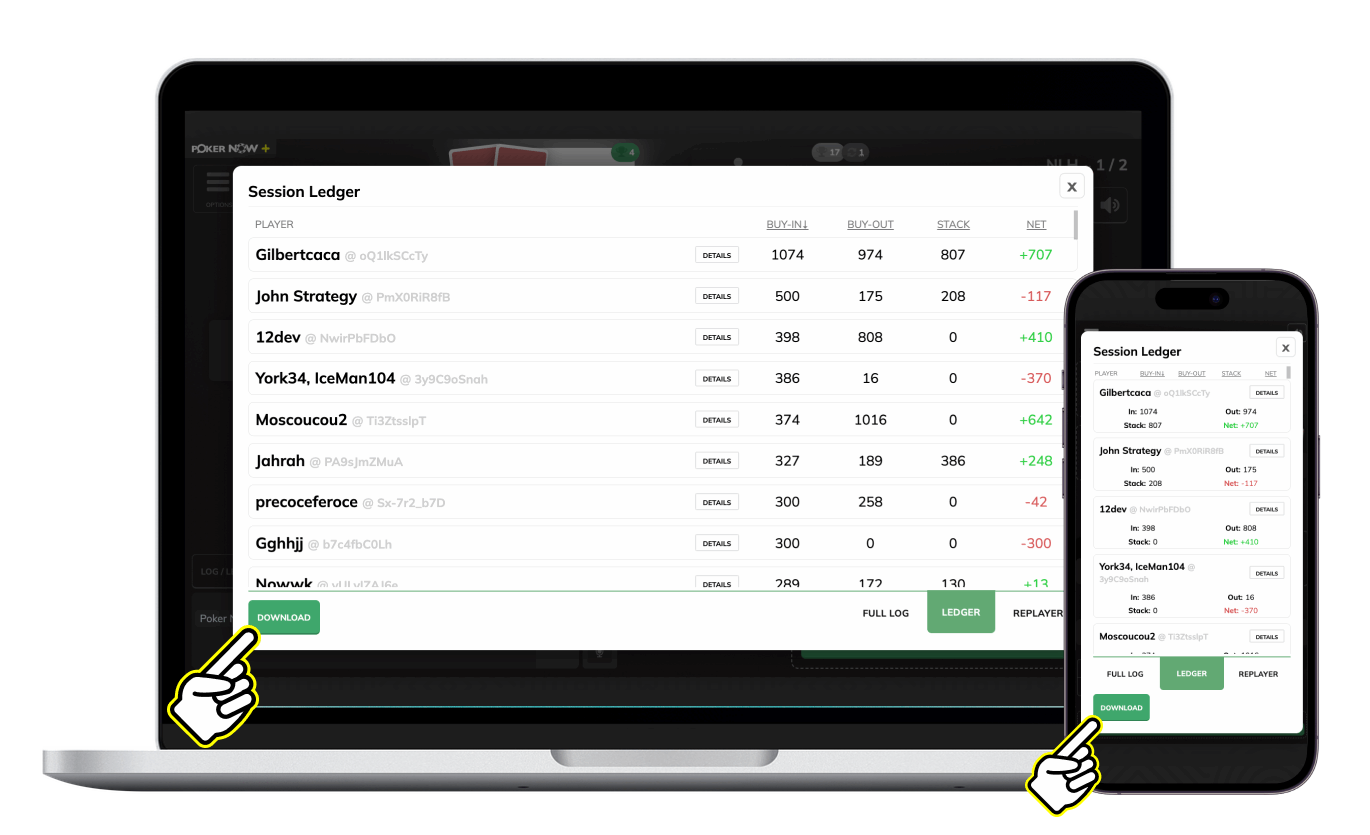
If your group wants a record outside the table, Poker Now also lets you download the ledger as a CSV file.
The export includes useful accounting fields such as:
- Player nickname
- Player ID
- Session start time
- Session end time
- Buy-in
- Buy-out
- Stack
- Net
That makes it easy to keep a record, share the result with the group, or use the data in your own spreadsheet after the game.
Useful for home games, cash games, and recurring groups
The Session Ledger is especially helpful for private poker groups that play together regularly. A clear home poker game ledger reduces manual tracking and helps everyone trust the numbers.
It is useful when:
- Players rebuy multiple times.
- Players join late or leave early.
- A host wants a clean buy-in and buy-out summary.
- The group wants a CSV record after each session.
- Players want to check their current result while the game is still running.
The feature is part of Poker Now’s free core game experience, so a group can create a private poker table and use the ledger without needing extra accounting software.
A cleaner way to settle the game
Poker is better when the table spends less time arguing about numbers and more time playing hands.
Poker Now’s Session Ledger gives private games a simple, built-in way to track buy-ins, buy-outs, stacks, and net results. Whether your group plays a quick casual session or a long home game with multiple rebuys, the ledger keeps the session easier to review and easier to settle.
Create a free private poker game on Poker Now and open the Session Ledger from the table log to see your buy-in and buy-out summary.
FAQ
What is a poker session ledger?
A poker session ledger is a record of each player’s buy-ins, buy-outs, current stack, and net result during a poker game. It helps the table understand who is up, who is down, and how the session should be summarized.
Does Poker Now track buy-ins and buy-outs?
Yes. Poker Now’s Session Ledger tracks player buy-ins, buy-outs, active stacks, and net results for supported games.
Can I export the Poker Now ledger?
Yes. The Session Ledger includes a CSV download with player, session, buy-in, buy-out, stack, and net fields.
Is the Session Ledger free?
Yes. The Session Ledger is part of Poker Now’s free core game experience for supported game types.
Does the ledger replace payment apps?
No. The Session Ledger summarizes poker session accounting inside Poker Now. How players settle payments outside the table is up to the group.
Ready to play poker with friends? Start a free game in seconds.
Start a Game