How to Play Poker Now on Multiple Devices at the Same Time
Published at: August 7, 2026
Poker Now runs in the browser, which makes it easy to move between devices. You can open your private poker table on a laptop, phone, tablet, or another computer without installing an app.
But there is one important detail if you want to use multiple devices at the same time:
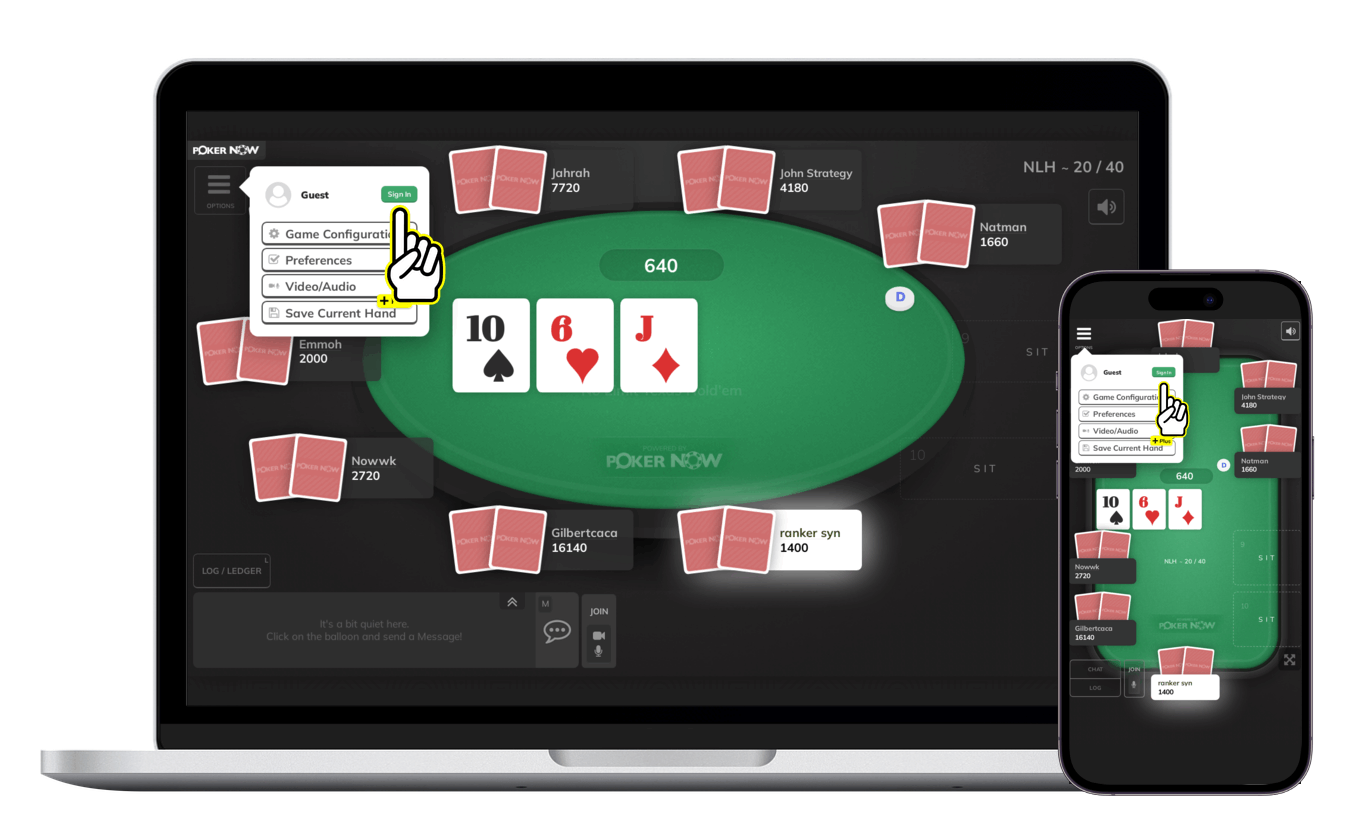
Sign in on each device with the same Poker Now account.
That is what lets Poker Now recognize you as the same player instead of treating each browser or device as a separate guest.
Why signing in matters
Poker Now lets people create and join private games with very little friction. For a quick home game, a guest can open a table link, choose a nickname, and start playing.
That is useful, but guest identity is tied to that browser session. If you open the same table from another phone, browser, or computer as a guest, Poker Now may see that as a different visitor.
When you sign in, your devices are connected to the same Poker Now player identity. That means your laptop and phone can point to the same player, the same seat, and the same account instead of creating separate guest personas.
In simple terms:
- Guest on one device: fast for one browser session.
- Signed in on multiple devices: best when you want the same player identity everywhere.
Common ways to use multiple devices
Playing poker on multiple devices does not mean taking extra seats. It means using more than one screen for the same player identity.
Common setups include:
- Playing from a desktop while keeping the table open on your phone.
- Moving from a laptop to a phone when you need to step away.
- Using a tablet as a second screen during a private home game.
- Keeping the table open on another device so you can follow the action while changing locations.
- Hosting a game on one device while checking the table from another.
This is especially helpful for private poker games with friends, where a session can last longer than expected and players may move between rooms, networks, or devices.
How to play on multiple devices
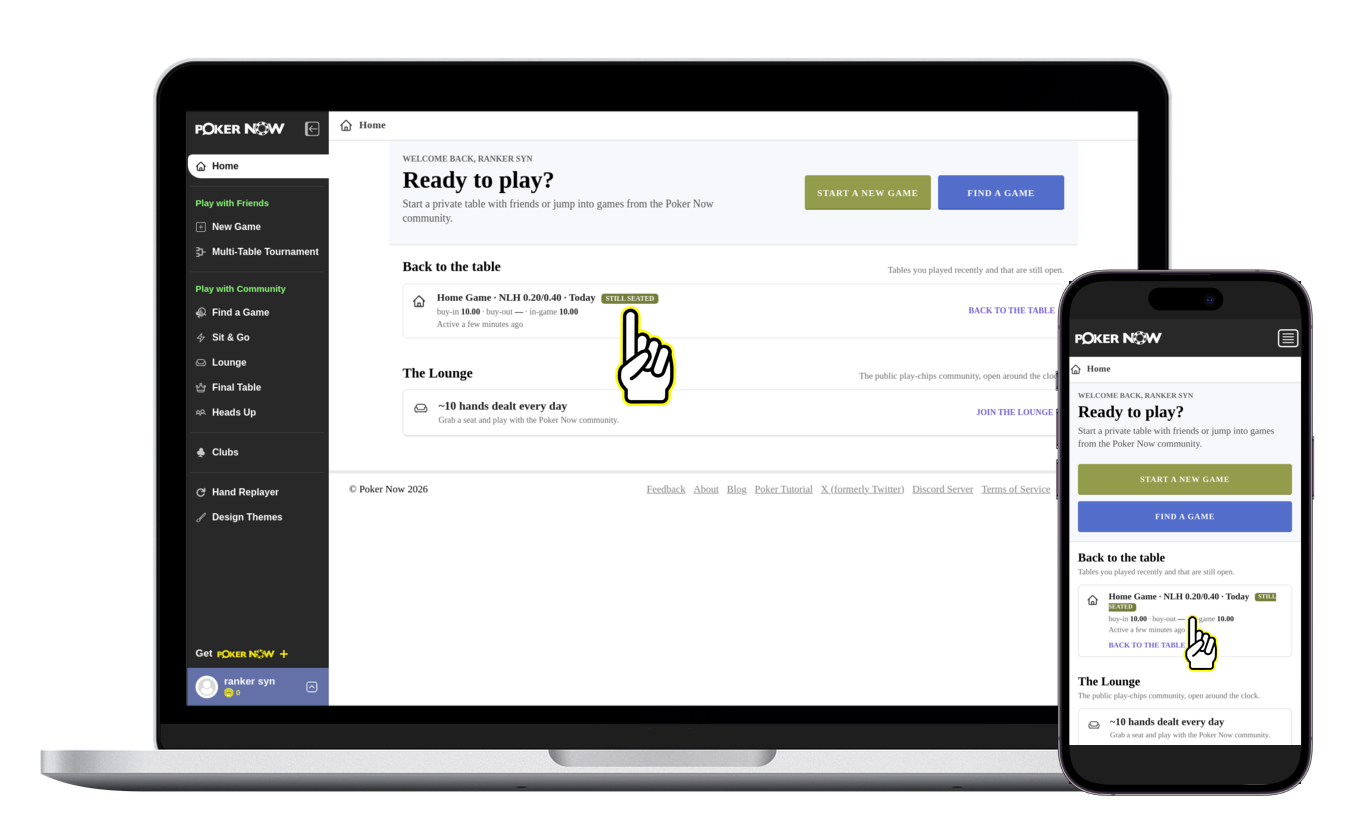
The cleanest setup no longer requires copying the table link between devices. When you are signed in, Poker Now Home lists your recent tables that are still open. If your account still has a seat, the game is marked Still seated under Back to the table.
- Sign in to your Poker Now account on the first device.
- Open your table and take a seat.
- On the second device, sign in with the same Poker Now account and open Poker Now Home.
- Under Back to the table, choose the game marked Still seated.
- Select Back to the table to return with the same player identity and seat.
You can still open the same game link directly on the second device. And if you already joined as a guest, sign in from that same table session first. After that, sign in with the same account on the other device and use Poker Now Home or the direct table link to return.
The key is not the device itself. The key is the account. Poker Now needs a stable player identity so each device knows it belongs to the same person.
What not to do
If you want to be the same player on multiple devices, do not join the table as a new guest on each device.
That can create confusion because each guest session can look like a different person. You might end up with a different nickname, a different player ID, or a separate request to take a seat.
You should also avoid using multiple devices to occupy extra seats in the same game. Multi-device play is for convenience and continuity, not for playing as more than one person.
Use one account, one player identity, and as many devices as you need.
Useful for mobile poker and desktop poker together
Some players prefer the larger table view on desktop. Others like the flexibility of mobile. With Poker Now, you do not have to choose only one.
You can start a private poker game on your computer, keep the game open on your phone, and move between them when it is practical. The browser-based experience makes this easier because there is no native app to install and no separate download to manage.
For casual home games, this can make the session smoother:
- A player can keep following the game after leaving the computer.
- A host can check the table from another device.
- A player who disconnects from one browser has another path back to the game.
- Long sessions are easier when players are not locked to one screen.
Does this require Poker Now Plus?
No. Signing in and using the same player identity across devices is part of the normal Poker Now experience.
Poker Now Plus adds premium features such as unlimited video and voice, private player notes, advanced hand history, custom table options, and other upgrades. But the basic idea of signing in so your account follows you across devices is not a Plus-only feature.
Why this is better than staying as a guest
Guest play is great for reducing friction. It lets a new player join quickly, which is one of the reasons Poker Now works well for private poker games with friends.
Signing in is better when continuity matters.
With a signed-in account, Poker Now can keep your player identity more stable across devices and sessions. That is useful when you want your profile, account features, game access, and table identity to follow you instead of being tied to whichever browser you opened first.
A simple rule
If you are using one device, guest play can be enough for a quick game.
If you want to play Poker Now on multiple devices at the same time, sign in on every device with the same account.
That keeps the experience simple: one player, one seat, one identity, across your phone, tablet, and computer.
FAQ
Can I play Poker Now on my phone and computer at the same time?
Yes. Open the same table on both devices and sign in with the same Poker Now account so both devices use the same player identity.
Do I need to sign in to use multiple devices?
You should sign in if you want to be recognized as the same player across devices. Guest sessions are convenient, but they are tied to a specific browser session.
Can I use one device as a backup?
Yes. Keeping the table open on another signed-in device can make it easier to stay connected or move between screens during a long poker session.
Can I take two seats with two devices?
No. Multi-device play is meant for one player identity across multiple devices, not for occupying multiple seats in the same game.
Does multi-device play require a download?
No. Poker Now runs in the browser, so you can use it on supported phones, tablets, laptops, and desktops without installing a native app.
Is this a Poker Now Plus feature?
No. Signing in to use the same account across devices is part of the normal Poker Now experience.
Ready to play poker with friends? Start a free game in seconds.
Start a Game